Razer Basilisk V4 Pro Adds AI Key to 12-Button Layout
The $169.99 mouse extends battery life to 200 hours but pushes thumb controls out of comfortable reach for many users.
By Katherine Barnes ·
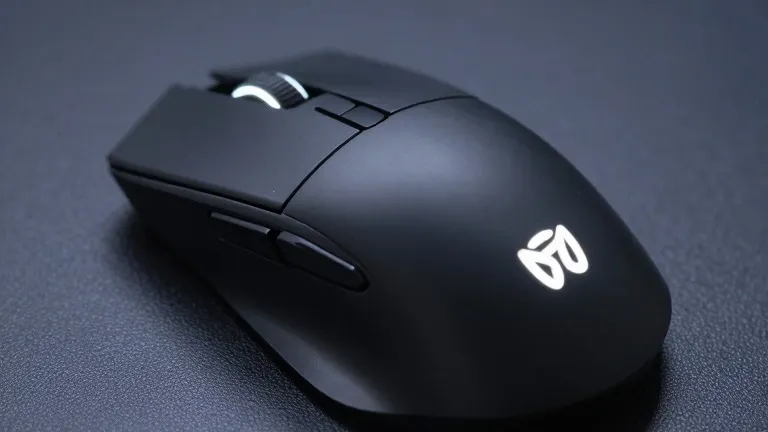
Gamer's left thumb now has to work harder to reach basic controls on Razer's newest flagship mouse. The Basilisk V4 Pro, released today, introduces a dedicated artificial intelligence button that disrupts the physical layout of the thumb cluster. While the device offers improved battery life and lower weight, the new key placement forces users to stretch their fingers to access standard functions.
The Basilisk V4 Pro is priced at $169.99 in black and white. It launched simultaneously with the Mouse Dock V2 Pro, a separate accessory sold for $69.99. The new mouse marks the first update to the Basilisk line since October 2024, when the Basilisk V3 Pro 35K released with a new sensor.
The total button count has increased from the previous model to 12 programmable inputs. A third thumb button, positioned in front of the existing pair, opens Razer's AI prompt by default. Additionally, a new button located beside the left mouse button switches profiles. The device measures 127.5 millimeters in length, placing the profile switch at the front edge.
Sarah Jacobsson Purewal, senior editor at Tom's Hardware, evaluated the device and found the new button placement awkward for users with medium-sized hands and long fingers. She reported that the profile button sits too far forward to press comfortably. The AI button, identical in size to the other thumb keys, pushes the existing cluster backward. This shift leaves the first thumb button, designated MB4, further away than before, making it difficult to reach without adjusting grip.
The reviewer noted that while buttons can be remapped, all three thumb keys felt slightly off in the default configuration. The review questioned the necessity of a dedicated AI prompt button on every peripheral. The mouse retains a right-handed, contoured shape with bright RGB lighting. It uses Razer's Focus Pro 50K optical sensor and fourth-generation optical switches, supporting polling rates up to 8,000 Hz.
Weight has decreased from 3.95 ounces on the V3 Pro 35K to 3.53 ounces on the V4 Pro. The black version weighs 100 grams, a reduction of nearly half an ounce. The tilt wheel offers two tactile modes with 24 and 48 steps, plus a free-spin option. The free-spin mode proved too sensitive and prone to accidental scrolling, while the precision tactile mode received praise from the tester.
Performance specifications include a 50,000 DPI sensor and 930 IPS tracking speed. The sensor tracks on most surfaces, including glass at least 4 millimeters thick. The switches are rated for more than 100 million clicks and produced no misclicks or double-clicks during testing. The reviewer stated the shape suits games ranging from MMOs to competitive shooters, though it may not suit top-level competition.
Battery life has increased from 150 hours to 200 hours at 1,000 Hz over 2.4GHz wireless. At the maximum polling rate of 8,000 Hz, the battery lasts 54 hours. The Mouse Dock V2 Pro includes an integrated 8,000 Hz receiver and eight RGB zones. The mouse box contains a USB-A dongle, an adapter, and a 6-foot braided cable, but lacks a HyperFlex cable or grip tape.
The review lists feel, lower weight, and battery life as primary strengths. Drawbacks include the AI button's impact on thumb layout, the price point, and the device's slightly large size. The Basilisk V4 Pro positions itself between the DeathAdder V4 Pro and the Naga V3 Pro, offering more functionality than stripped-down shooter mice without the high button count of the Naga.
Source: Tom's Hardware